FileDeep Manager organizes Android storage with built-in media viewers
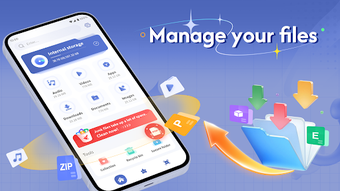
FileDeep Manager from LKW ELE is a local file management app that helps organize cluttered Android storage with one central explorer. It lets users browse internal storage, move, rename, and sort files, and includes built-in audio, video, and image viewers so common media opens without extra apps. The app automatically categorizes files into Images, Audio, Video, Documents and shows detailed file info, making it suitable for Android users who prefer a single, compact file hub and faster file access.
What does FileDeep Manager do?
FileDeep offers local file browsing and direct manipulation of internal storage, aimed at day-to-day cleanup. Basic operations include moving, copying, renaming, deleting and sharing, while sort options let you order items by name, modification date, or size. The app displays detailed file and folder metadata and provides both grid and list viewing modes, helping users locate large or old items for targeted housekeeping.
How does FileDeep handle media without extra apps?
The app integrates playback and viewing so media stays inside the explorer instead of opening separate players. Audio playback supports shuffle and loop modes; the video player offers portrait and landscape layouts plus a screen lock to prevent accidental taps. Images open in the built-in viewer and can be applied as wallpapers directly, which reduces the need to switch between multiple apps during media review.
Is it safe to use on a production device?
FileDeep requests standard storage access permissions to read and modify internal files and performs direct write actions such as moving or deleting items. Because the app executes those operations on local storage, users should confirm selections before destructive actions. The app is rated for Everyone and targets phones and tablets, and the product description does not mention an integrated backup or rollback mechanism to undo changes automatically.
Do I need technical knowledge to use FileDeep Manager?
The interface uses a clean, minimalist design and presents one-tap categorization pages for Images, Audio, Video and Documents, so casual users can sort clutter quickly. At the same time, archive decompression support and detailed item metadata give more control to experienced users who inspect file paths and modification times. Choose the grid or list view depending on whether you prefer thumbnails or compact file lists.
Practical recommendation for focused local storage maintenance
FileDeep is a pragmatic option for users who need focused local storage maintenance on phones and tablets. It suits people who manage files directly on-device rather than via cloud tools. Practical precaution: verify selections and keep separate copies of important data before bulk reorganizations. For large migrations, prepare a step-by-step plan and test on a small folder. Use the app during idle hours to avoid interruptions. Recommended.